You can have a beautiful ceremony site, carefully written vows, and a reception playlist ready to go, yet still lose the most important words to wind, distance, or a sudden Bluetooth dropout. Outdoor ceremonies expose weak audio quickly. A microphone that sounds acceptable during a quiet setup can become muffled once guests settle in, while a speaker aimed at the front row may leave everyone behind it straining to hear.
A dependable sound system for an event isn't defined by how loud it can get. It's defined by whether the officiant, couple, speakers, and musicians remain clear across the entire audience area, then transition smoothly into dinner and dancing. The practical approach is to plan coverage, signal paths, microphone placement, and backup control before the first guest arrives.
Table of Contents
- Why Event Sound Fails at the Worst Moments
- Mapping Coverage for Indoor and Outdoor Spaces
- Choosing Microphones and Signal Paths
- Bluetooth Hookup and Reception Audio Workflow
- Working with Venue Systems and Outside AV Vendors
- Future-Proofing for Accessibility and Hybrid Events
Why Event Sound Fails at the Worst Moments
The failure usually begins without warning. During a ceremony rehearsal, the officiant speaks into a wireless microphone and the sound seems fine. On the actual day, a breeze hits the capsule, the vows pick up popping noise, and guests at the back hear fragments instead of complete sentences. A reception toast can create a different problem. Someone walks in front of a speaker, the microphone gets too close to the PA, and feedback cuts through the room just as the best man starts speaking.
Bluetooth introduces another familiar risk. A phone connects successfully during setup, then a notification, incoming call, device switch, or unstable connection interrupts the first-dance song. The equipment may be functioning exactly as designed. The workflow wasn't.
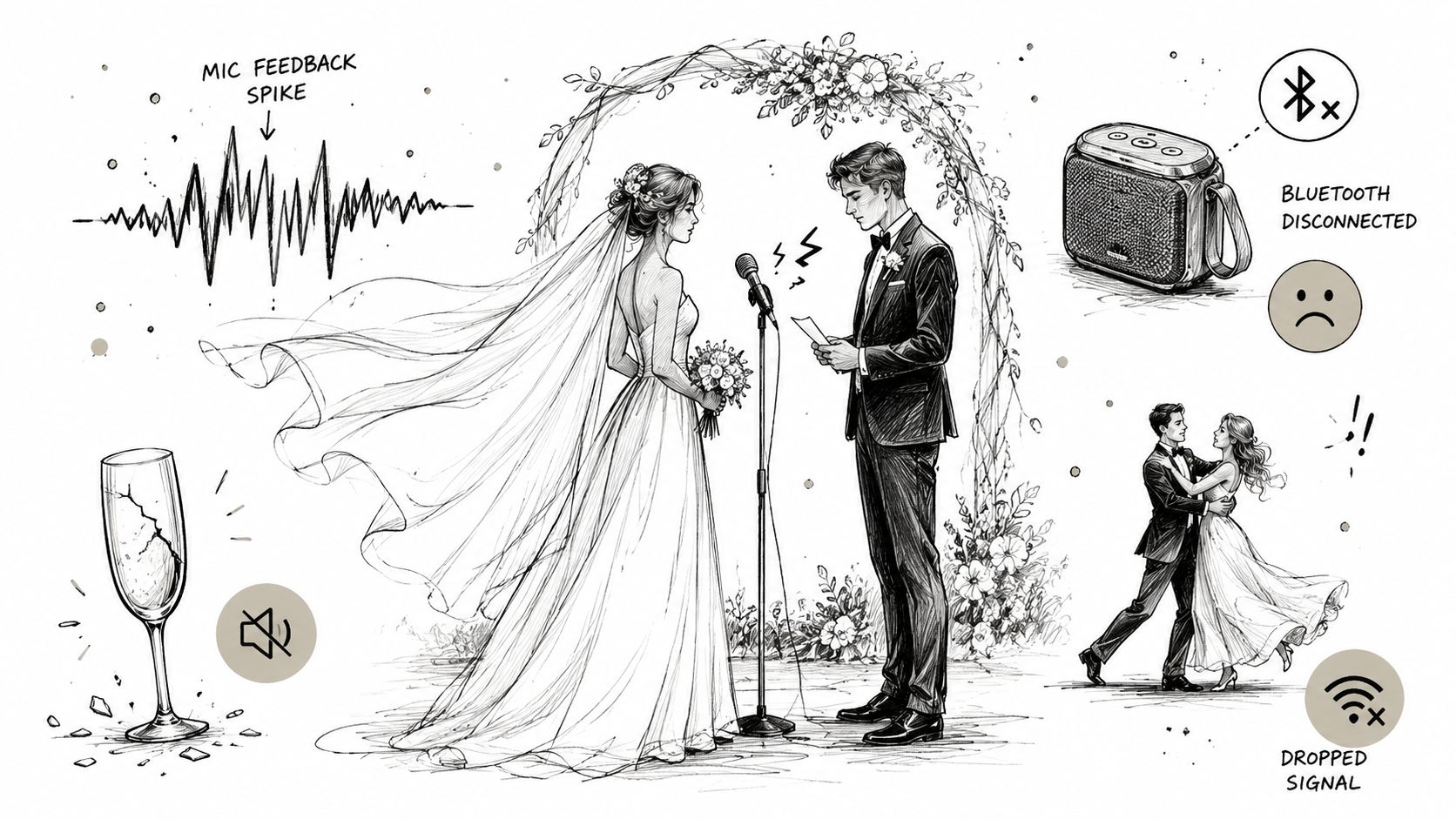
The problems planners should identify early
Three patterns account for many avoidable complaints:
- Muffled spoken audio: Wind, clothing friction, poor microphone technique, and incorrect speaker placement reduce intelligibility before anyone considers volume.
- Uneven audience coverage: Guests near the speakers hear too much while rear rows hear too little. Turning up the main PA rarely fixes that balance.
- Uncontrolled connections: A shared phone, untested Bluetooth receiver, or last-minute laptop creates a fragile playback chain.
The remedy is not automatically a larger amplifier. It's a deliberate plan for who speaks, where each listener sits, how far the signal must travel, and who controls the levels. Ceremony audio deserves its own test because speech has a narrower margin for error than background music.
Practical rule: If the person responsible for music can't explain the backup connection and the person responsible for microphones can't identify the audience coverage limits, the system isn't ready.
Ask the venue or AV provider specific questions. Where will the speakers stand? Is the microphone signal wired or wireless? Who monitors levels during vows and toasts? Can the system cover both an outdoor ceremony site and an indoor reception room without moving guests or improvising cables? Those answers tell you more than a checklist that only says “PA included.”
Mapping Coverage for Indoor and Outdoor Spaces
Treat event sound as a geometry problem, not a wattage contest. The relevant measurement is the distance between the loudspeaker and the farthest listener, along with the speaker's coverage pattern and the shape of the audience area. A powerful system aimed in the wrong direction can produce louder front-row sound while leaving the back poorly served.
Start by drawing the ceremony or reception footprint. Mark the main speaker positions, the nearest listeners, the farthest listeners, walkways, walls, reflective surfaces, and any change between indoor and outdoor zones. A venue with outdoor grounds and a climate-controlled reception hall requires two related plans, not one generic PA setting. Texas Old Town's indoor and outdoor event space is the kind of mixed layout where that distinction matters.
A coverage-first calculation
Use this sequence before selecting equipment:
- Measure the farthest listener distance. Work backward from the rear of the audience, not forward from the stage.
- Account for distance loss. Sound pressure level drops by about 6 dB every time listener distance doubles, as explained in Live Sound 101 event sound system design.
- Choose the target by event type. Outdoor or mixed-space guidance places speech roughly at 75 to 85 dB SPL, while background or live-music reception areas sit around 85 to 95 dB SPL, with the same source recommending 10 to 20 dB of headroom for control and clean peaks.
- Add operating margin. That guidance generally means oversizing amplifier power by 2 to 4 times and operating the system around 70 to 80% capacity, rather than forcing it to run at its limit.
- Check the overlap. Main speakers and delay fills should meet with only about 3 to 6 dB of level difference so guests don't hear a sudden jump or an obvious phase problem.
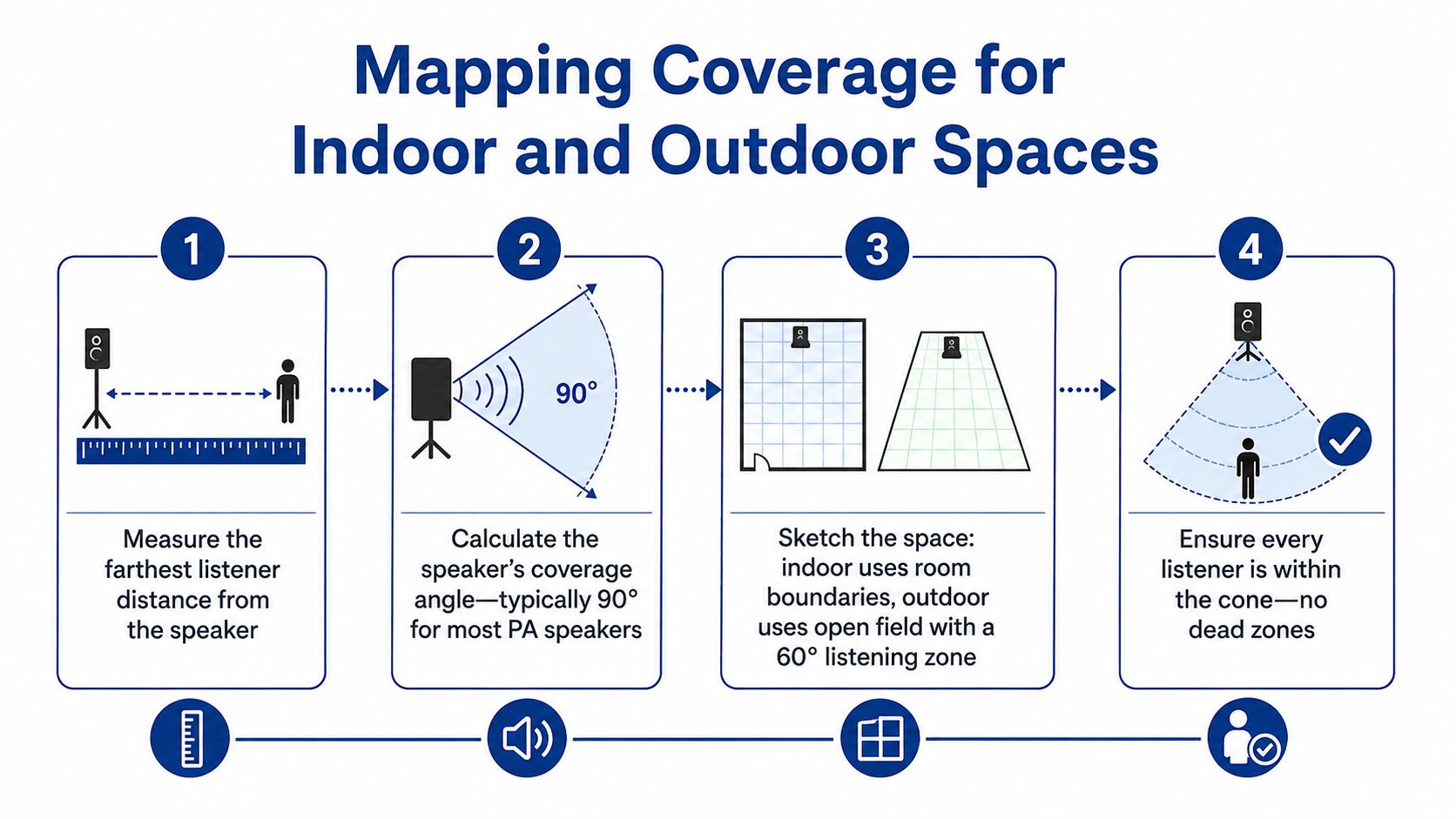
A long outdoor audience area often needs delay speakers once listeners are more than about 30 to 40 meters from the main PA, according to this outdoor lighting and sound guide. Delays shouldn't be turned up until they sound prominent. They should reinforce the rear zone while blending with the mains.
For planners comparing portable options, it can help to browse event equipment hire after the coverage sketch is complete. Equipment should follow the map. Renting a larger speaker without confirming its throw, dispersion, and placement won't solve a dead zone.
A final walk test matters more than a specification sheet. Stand at the ceremony entrance, the center aisle, the last row, and the edges of the reception area. Check speech at each point, then listen for level changes as you move between zones. The goal is consistent intelligibility, not maximum loudness at the speakers.
Choosing Microphones and Signal Paths
Microphone selection should follow the speaker's movement and the consequence of failure. A stationary lectern speaker can use a wired microphone with a dependable cable path. An officiant walking through an outdoor ceremony needs mobility, but that convenience brings RF coordination, battery management, and coverage checks.
A wired microphone remains the safest choice for critical spoken moments when movement isn't essential. It avoids wireless transmission issues, though the cable must be secured away from guests and wedding-party movement. A wireless handheld works well for toasts and announcements because the speaker can pass it between people, but an operator must manage mute status, gain, batteries, and hand position.
A lavalier keeps the officiant's hands free, yet clothing placement and wind can make speech less consistent. A headset generally keeps the microphone closer to the mouth and can improve consistency, but it may not suit every ceremony style. Outdoor microphones need windscreens, and the speakers should sit in front of the microphone line from the audience's perspective. That placement helps reduce the feedback loop created when amplified sound reaches the microphone.
The following comparison keeps the trade-off visible:
| Microphone Type | Best For | Reliability | Key Consideration |
|---|---|---|---|
| Wired handheld or lectern | Readings, speeches, fixed positions | High when the cable is protected | Limits movement and requires safe cable routing |
| Wireless handheld | Toasts, announcements, guest participation | Good when RF is coordinated | Requires battery, frequency, and handoff management |
| Lavalier | Mobile officiant or presenter | Variable outdoors | Clothing noise and wind protection matter |
| Headset | Presenter who needs consistent mouth distance | Strong when fitted correctly | Appearance, comfort, and fitting require planning |
For a deeper explanation of microphone design and use, Isolate Audio's microphone guide provides useful background, although event speech reinforcement still depends heavily on placement and signal routing.
Build the channel plan before arrival
List each source separately. A ceremony may need an officiant microphone, a couple's microphone arrangement, a reading microphone, and playback for processional music. The reception may add a toast microphone, DJ or laptop playback, video audio, and announcements. Each source should have an identifiable channel so an operator can adjust it without affecting everything else.
Wireless microphones deserve a pre-scan in dense venues. Use diversity antennas where appropriate, test coverage at the loudest audience area rather than only beside the stage, and keep a wired fallback available for vows or formal speeches. A short live sound check should include actual walking paths, clothing, wind exposure, and the people who will speak. “It worked in the room” isn't enough if the ceremony takes place outside.
Bluetooth Hookup and Reception Audio Workflow
Bluetooth is useful for background playlists, cocktail-hour music, and simple reception playback. It becomes unreliable when everyone assumes pairing equals a complete operating plan. A phone can connect to the venue receiver and still fail later because another device takes control, the playback app buffers, the battery drops, or the operator walks beyond a stable range.
Assign one person to playback. That person should control the device throughout the event, keep notifications disabled, prevent automatic device switching, and avoid using the same phone for calls or guest interaction. Download playlists for offline playback so the music isn't dependent on a live connection.
A controlled connection sequence
Use the venue's actual equipment during the rental window, not a home speaker as a substitute:
- Pair the designated phone, tablet, or laptop with the venue receiver.
- Confirm that no other device remains connected or ready to take over.
- Play a sample track and check both indoor and outdoor listening areas.
- Set playback and mixer levels with room for peaks, rather than pushing the source to its maximum.
- Keep the device powered and place the backup connection within reach.
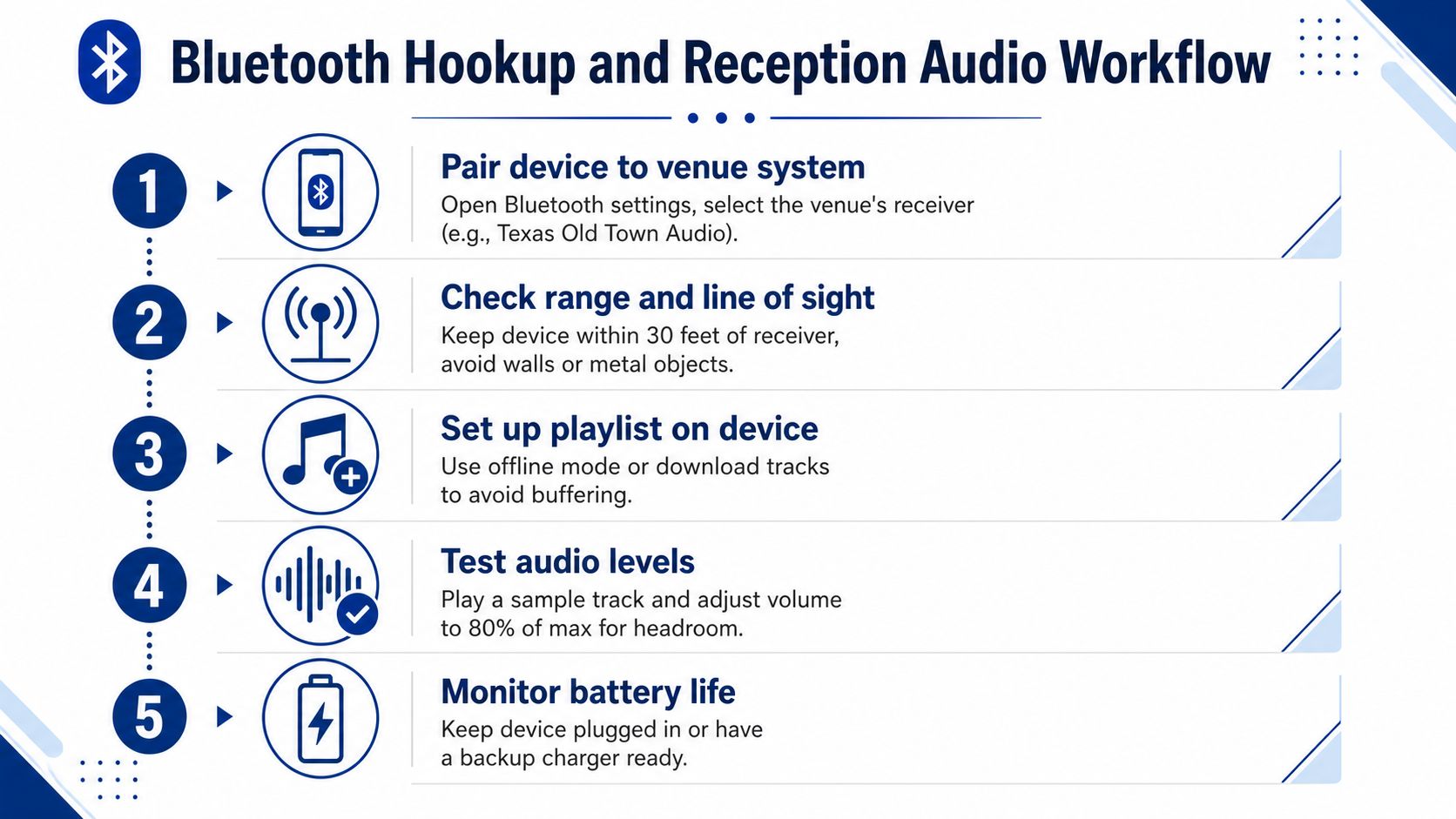
Range isn't only a distance issue. Walls, metal objects, crowded rooms, and competing wireless equipment can change the connection environment. The broader principle behind signal strength in wireless networks applies here too. The connection should be tested where the playback device will be used, not just beside the receiver.
Plan the reception transitions
Prepare separate playlists or clearly labeled sections for guest arrival, cocktail hour, dinner, formal entrances, first dance, and open dancing. Keep the transitions simple. A long queue that depends on manual searching increases the chance of playing the wrong track or leaving silence between moments.
Use a wired auxiliary connection as the primary fallback when the venue system supports it. Keep an offline playlist on a second device, with the necessary cable and adapter already tested. If the event includes timed entrances, multiple microphones, live musicians, or a dance-focused program, a dedicated DJ or playback operator is usually more dependable than a guest holding a phone.
Bluetooth is a convenient input. It isn't a substitute for an operator, a backup, or a sound check.
Working with Venue Systems and Outside AV Vendors
A built-in PA can be sufficient when the event has straightforward spoken audio, moderate coverage needs, and a small number of inputs. It becomes less suitable when the program includes multiple zones, remote participants, assistive listening, presentation playback, or a large outdoor audience whose rear edge sits far from the main speakers.
Texas Old Town provides indoor and outdoor PA systems, Bluetooth hookup, a wireless microphone, and on-site venue management as part of its published venue amenities. That baseline can work for a ceremony and reception with conventional requirements, but the planner still needs to confirm placement, microphone handoff, playback responsibility, and the exact coverage area.
Start with the event, not the equipment list
A ceremony in Redbud with up to 150 guests, or a reception in Tejas with up to 320 guests, represents different planning conditions because capacity, room shape, seating arrangement, and program complexity all affect coverage. Those capacities are listed in the venue information, not a guarantee that one speaker position will serve every seat equally.
Use these questions during the venue walk-through:
- Speech coverage: Can someone at the farthest seat understand vows without watching the speaker's face?
- Microphone control: Who changes levels between the officiant, couple, and toast speakers?
- Playback ownership: Does the venue operator control Bluetooth, or does the couple provide a dedicated person?
- Outdoor transition: Will the ceremony system remain in place, or will the reception use a separate signal path?
- Input requirements: Does a corporate presentation need laptop audio, video sound, panel microphones, or recording feeds?
The venue inspection checklist can help planners organize those questions alongside sightlines, access, and room logistics. Bring the actual run of show to the inspection. A system that handles one microphone and background music may not support a panel, video, and streaming feed without an outside mixer.
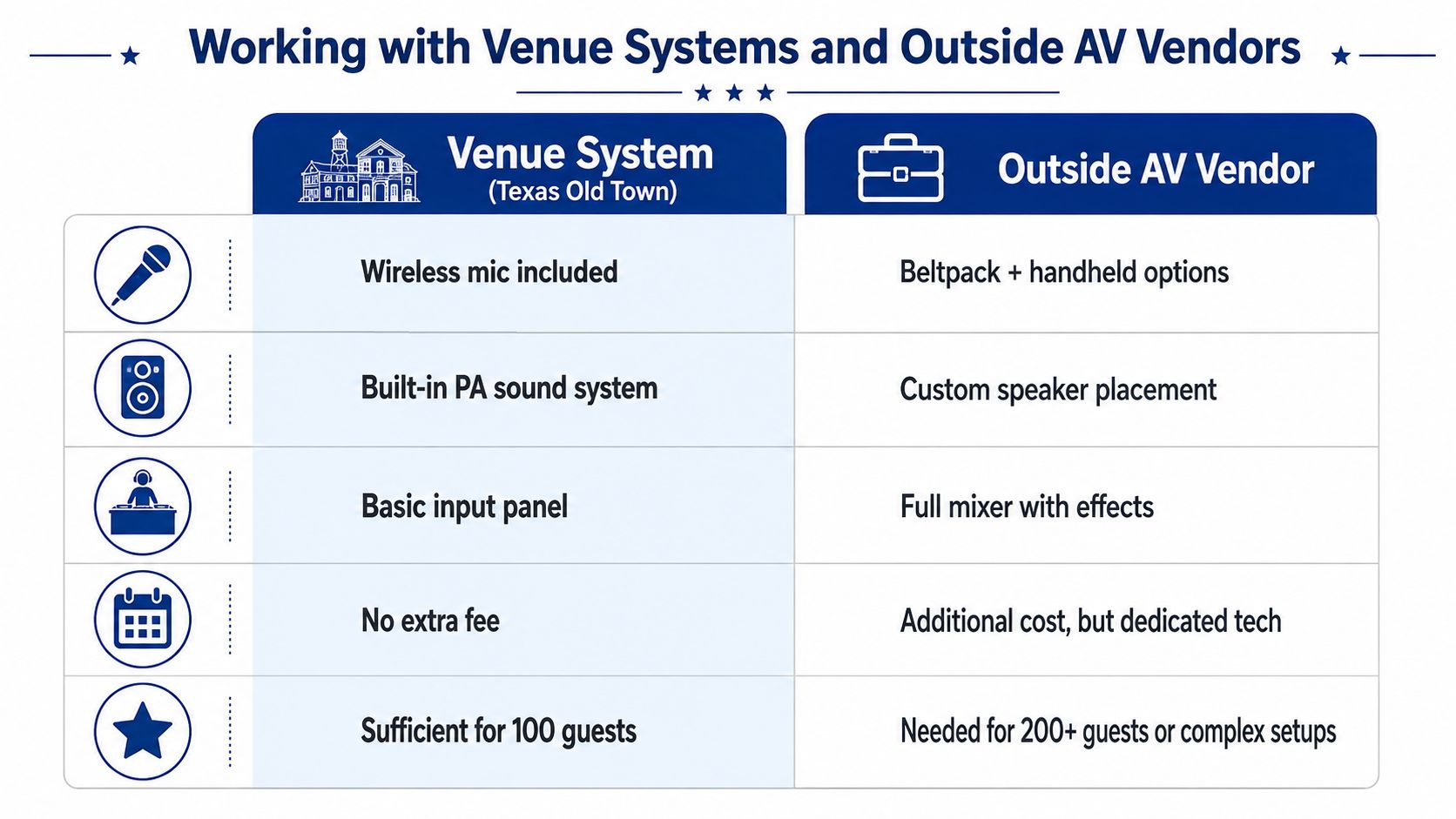
When external AV support earns its place
Bring in an outside AV team when the event needs custom speaker placement, multiple delay zones, a dedicated technician, complex presentation routing, or a separate broadcast mix. Hybrid events require clean audio feeds for remote viewers, which often means routing microphones and playback separately from the room speakers. Hearing accessibility may require assistive listening equipment and careful level management rather than just turning up the main PA.
Immersive audio is another decision, not an automatic upgrade. A standard stereo system remains appropriate for many corporate and social events. Spatial or immersive systems add infrastructure, production coordination, and expense, so they make more sense for a branded experience where the sound design is central to the program.
Coordinate outside vendors early. Confirm load-in during the 16-hour rental window, access through the prep kitchen service entry, cable routes, power locations, equipment storage, and who has authority to change levels during the event. Give the AV team a site map, audience count, run of show, microphone list, and the farthest listener distance. That information is more useful than saying, “We need it loud.”
Future-Proofing for Accessibility and Hybrid Events
Event audio planning now has to account for guests who aren't standing in the room. A remote attendee needs a clean, controlled feed rather than the sound of a camera microphone pointed at the back of a hall. A guest with hearing needs may require an assistive listening solution, clear speech reinforcement, or both. These needs should be identified during planning, not discovered when the first presenter speaks.
Industry coverage describes accessibility technology as moving toward standard practice, while also highlighting AI-assisted calibration, cloud-managed AV, AV-over-IP, and spatial sound as developing parts of event production. The same coverage treats spatial audio as optional and expensive, with standard stereo still suitable for many corporate events, as discussed in event technology trends for 2026.
Match the upgrade to the audience
For a conventional ceremony and reception, focus first on intelligible speech, stable microphones, consistent coverage, and a reliable playback fallback. Those fundamentals solve more real guest problems than an immersive system added without a clear purpose.
Hybrid or accessibility-focused events need a more deliberate design:
- Remote participation: Ask whether the mixer can provide a separate feed for streaming without sending excessive room ambience or speaker output back into the call.
- Hearing access: Confirm which assistive listening devices the venue or AV vendor can support and where guests will receive them.
- Presentation audio: Test laptops, videos, microphones, and remote speakers as separate sources so an operator can control each one.
- Networked systems: AV-over-IP and cloud-managed equipment can increase routing flexibility, but they also require compatible infrastructure and technical oversight.
Texas Old Town's accessibility features should be reviewed alongside the sound plan, especially when guests have mobility, hearing, or communication needs. Ask for the practical details: where equipment can be positioned, how guests access it, and who monitors it during the program.
The right future-proofing decision is selective. Invest in the capability that serves a known guest or production requirement. Keep standard stereo coverage when the event is local, speech-led, and operationally simple. A modest, well-tested system with an accountable operator will outperform an advanced setup that nobody has rehearsed.
Texas Old Town offers indoor and outdoor PA systems, Bluetooth hookup, a wireless microphone, and on-site venue management across its indoor and outdoor event settings. Review your ceremony coverage, signal path, and accessibility needs with the venue team, then visit Texas Old Town to schedule a tour and plan the sound workflow around your actual event.