The florist is unloading, the photographer is asking where family portraits should happen, and the caterer is waiting for access to the prep kitchen. Meanwhile, the couple is still in the dressing suite and guests are due to arrive soon. A vague agenda that says “setup,” “photos,” and “ceremony” won't help anyone decide what happens next.
A useful event day schedule template works differently. It assigns a specific owner to each time block, plans around fixed anchors, and protects empty space for the delays that no venue team can eliminate completely. At Texas Old Town, that approach fits an exclusive 16-hour window from 8:00 a.m. to midnight, giving organizers room to coordinate setup, celebration, and closeout without forcing every task into a compressed sequence.
Table of Contents
- Why Your Event Day Needs a Minute by Minute Schedule
- What Goes Inside a High Performing Event Day Schedule Template
- How to Build Your Timeline Around Fixed Anchors and Buffers
- Real Texas Old Town Timeline Examples You Can Copy
- Pro Tips to Keep Vendors Guests and Staff in Sync
- Download Customize and Own Your Event Day
Why Your Event Day Needs a Minute by Minute Schedule
At a Hill Country wedding, a delay rarely stays in one place. If hair and makeup runs late, portraits move. If portraits move, the ceremony party arrives late. If the ceremony ends late, cocktail hour shortens, dinner service shifts, and the entertainment team loses time for a clean transition.
The problem usually isn't a lack of effort. It's that the schedule describes activities without describing handoffs. “Cocktail hour” doesn't tell the catering lead when service begins, the photographer when family photos finish, or the venue manager when guests should move indoors.
An agenda describes the experience
An operational schedule describes the work required to deliver it. Each line should answer four questions:
- What happens: Name the activity precisely, such as vendor load-in, sound check, guest seating, or final room reset.
- When it happens: Use a start time and an end time, not a broad period such as “morning.”
- Who owns it: Assign one accountable lead, even when several people assist.
- What follows: Identify the next handoff, location change, or decision point.
That structure matters because events involve overlapping teams. The photographer may need the couple, the DJ may need power and a clear sound-check window, and the caterer may need uninterrupted access through the prep kitchen service entry. Without one named owner, everyone assumes someone else is watching the clock.
Practical rule: If two people own a time block, nobody owns the decision when the block slips.
A longer rental window still needs discipline
More access time creates options, but it doesn't automatically create coordination. Texas Old Town's venue window runs from 8:00 a.m. to midnight, with exclusive use of the selected hall. That makes it possible to separate vendor arrival, dressing, ceremony preparation, guest arrival, reception, and breakdown instead of stacking them on top of one another.
The schedule should therefore include both the guest-facing program and the invisible work behind it. For a wedding, that can mean dressing suite access, furniture placement, Bluetooth PA testing, wireless microphone checks, outdoor ceremony preparation, indoor reception readiness, and transportation handoffs. For a corporate dinner or milestone party, it may include registration, presentation cues, meal service, speeches, and equipment removal.
Many events are still planned under compressed conditions. In a 2026 analysis of booked brand activations, the median planning lead time was 28 days, with the middle half of bookings between 14 and 55 days, and 51.7% booked within 29 days of the event date (SchedulingKit's event-planning statistics). That reality makes a clear day-of document more valuable, not less.
By the end of this process, you'll have a buffer-aware schedule with separate vendor and VIP versions. Couples, families, planners, and staff can each see the information they need without sorting through someone else's logistics.
What Goes Inside a High Performing Event Day Schedule Template
A schedule earns its place in the control folder when a vendor can open it and find the next decision quickly. Put the operating picture above the timeline, then divide the day into fixed anchors and protected buffer blocks. For a 16-hour venue window, use separate vendor and VIP versions. The vendor sheet carries movements, setup, cues, and contingencies. The VIP sheet shows arrival points, private-room access, portraits, ceremony, reception, and other information guests or family need.
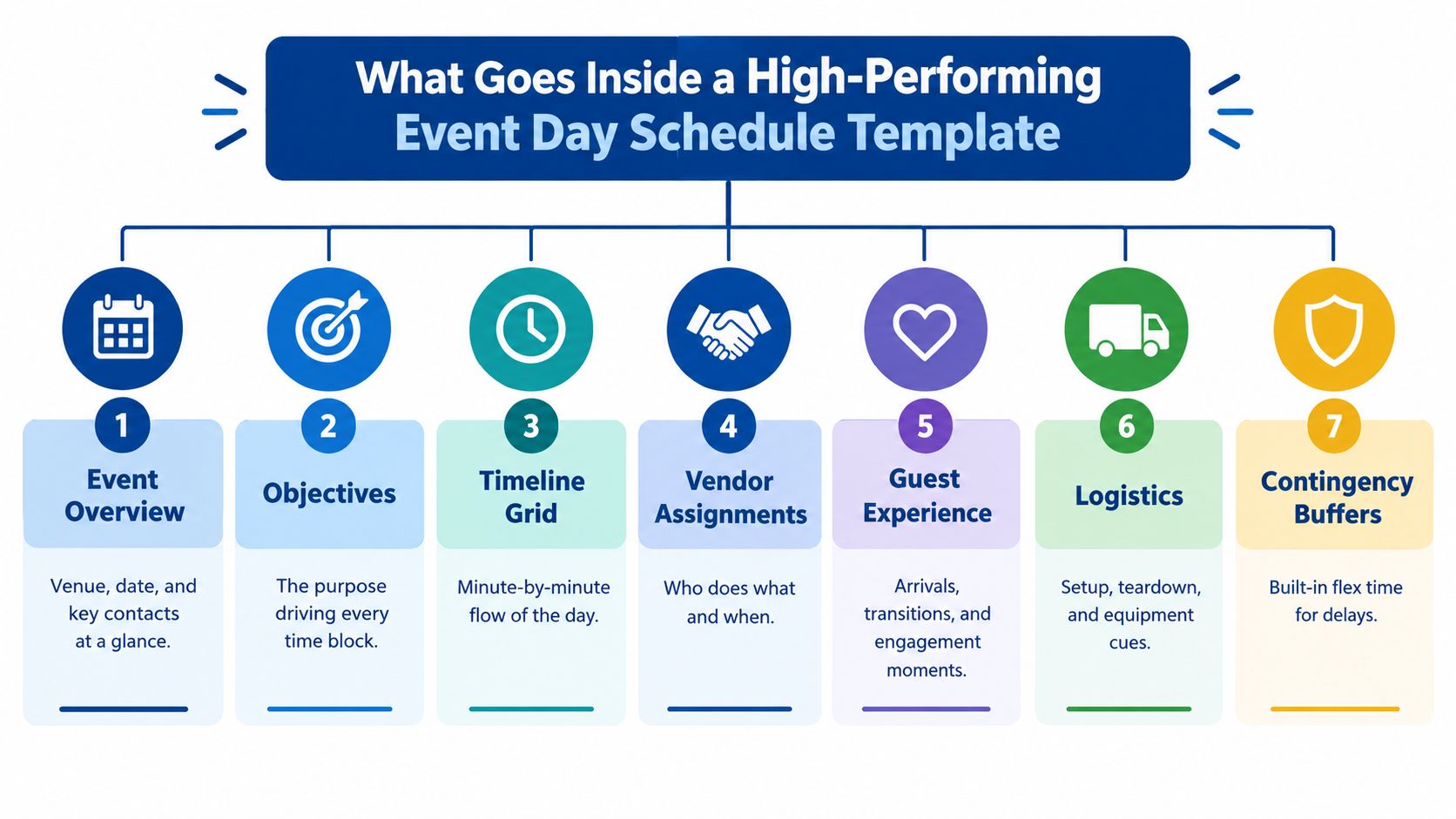
The most reliable template has seven connected sections. Event-planning guidance also recommends separating before, during, and after phases, keeping setup and closeout visible alongside the guest-facing program (event-planning checklist guidance).
Start with the operating picture
Event overview belongs at the top. List the event type, venue or hall, date, ceremony and reception locations, access window, key contacts, and the person authorized to make day-of decisions. Add the version label, such as vendor or VIP, so no one works from the wrong sheet.
Objectives explain why each major block exists. A wedding may protect a calm guest arrival and complete family portraits. A quinceañera may require a carefully timed entrance, formal court presentation, and dance sequence. A corporate event may prioritize registration flow, presentation cues, and dependable meal service.
Backward-planned milestones connect advance work to the final run-of-show. Confirm vendor arrivals, menu details, furniture counts, room layout, ceremony plan, transportation, and weather decisions before calling the schedule stable. Industry planning guidance commonly places event schedules on an 8–12 week timeline from concept to execution, with weekly milestones and final run-of-show checkpoints (event planning benchmark).
Budget touchpoints should flag choices that can alter the day. Mark rental additions, overtime exposure, bar arrangements, staffing, transportation, and floor-plan changes. The schedule does not need to repeat the full budget.
Build the day-of control layer
Role ownership keeps a delay from becoming everyone's problem. Assign one accountable lead for venue operations, catering, entertainment or AV, photography, transportation, guest flow, and family or VIP coordination. List assistants beside each lead, but make the decision-maker unmistakable.
Marketing, registration, or guest flow varies by event. Rows may cover check-in, escorting guests to an outdoor ceremony, moving guests from cocktail hour to dinner, accessibility needs, or a corporate registration table. Put the owner and handoff beside each movement.
The final run-of-show is the working grid. Use columns for time, activity, location, owner, supporting team, cue, buffer status, and contingency note. Separate before, during, and after phases. Protect empty blocks instead of filling every minute.
Texas Old Town details belong in the relevant rows. Include dressing suites, private restrooms, indoor and outdoor PA systems, Bluetooth hookup, wireless microphone, prep kitchen service entry, published furniture counts, beverage bar, parking, and the indoor or outdoor ceremony decision. The vendor version should state where teams report and what they verify. The VIP version should show where people go, when they move, and whom to contact. That distinction prevents a useful schedule from becoming an overcrowded sheet.
How to Build Your Timeline Around Fixed Anchors and Buffers
An event can start on time and still finish in chaos. A late vendor, extended family photos, or a weather change can consume the afternoon unless the schedule protects time before the first delay occurs.
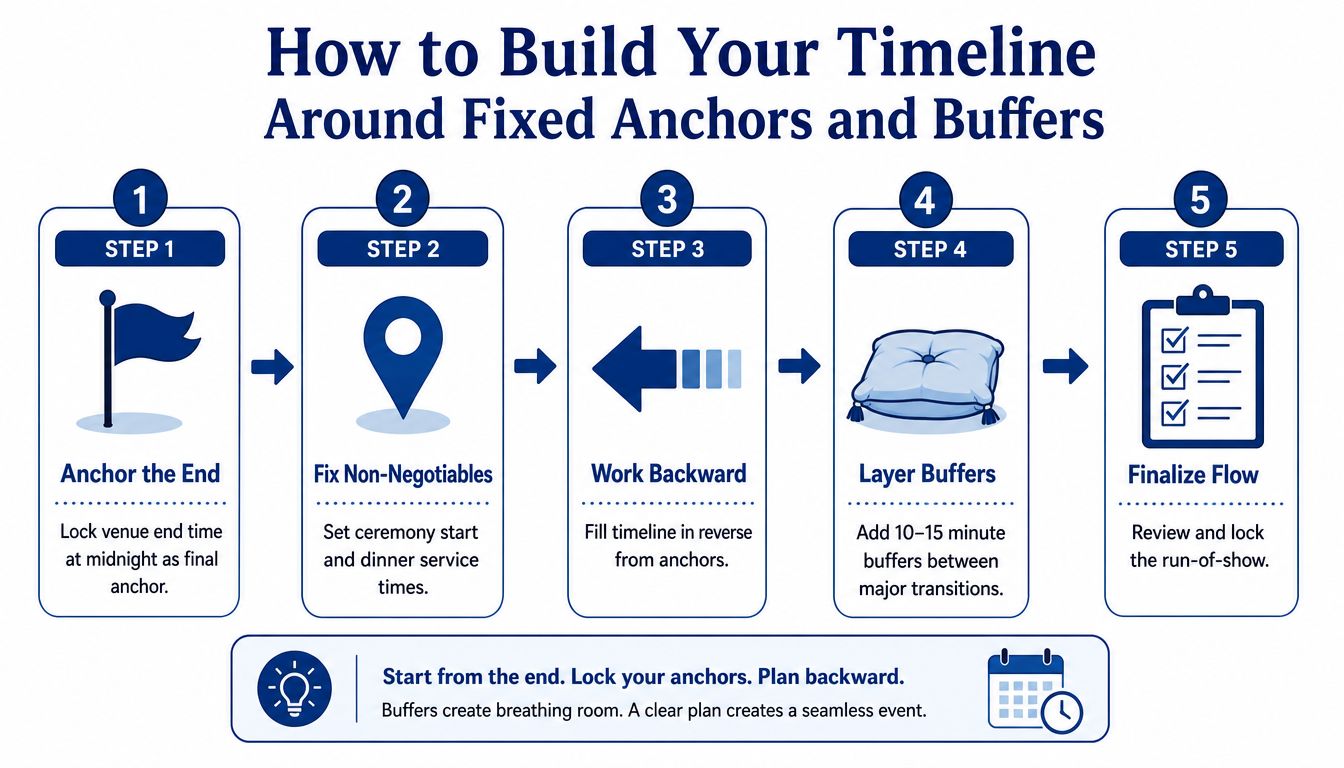
Build backward from commitments that cannot move. For a Texas Old Town event, the final anchor is the midnight venue end time. Work backward to reserve breakdown, vendor departures, guest exit, final music, and any required room reset. The full operating window may span 16 hours, so use separate versions of the schedule: a vendor copy with access, setup, and handoff details, and a VIP copy with movements, call times, and contacts.
Set the anchors first
Use this order:
- Lock the end: Enter midnight as the final venue boundary. Decide when the last guest-facing activity ends and when breakdown begins.
- Set key moments: Place the ceremony, dinner service, formal entrance, speeches, or presentation cues that matter most to the host.
- Work backward: Add preceding activities in reverse order. Dinner requires room readiness, guest movement, seating, and service preparation.
- Layer buffers: Protect time between major transitions. Planning guidance recommends 10–15% buffer time and 15–20 minute empty pockets for delays (wedding timeline buffer guidance).
- Finalize flow: Review the sequence with confirmed vendors, assign owners, and lock the working version.
Put buffers where people change location
A buffer does the most work at a handoff. Protect the end of hair and makeup, vendor load-in, the move from dressing suites to portraits, formal photos, transportation arrivals, guest movement between outdoor and indoor spaces, and the transition into dinner.
Label the block protected flex time. Do not assign another task to it. The owner can use it for a late arrival or technical check, but the schedule should not depend on filling it.
Weather needs its own line. Name the decision owner, review time, indoor backup location, sound-system change, and guest communication cue. Texas Old Town supports indoor and outdoor ceremony arrangements, yet the team still needs a clear trigger for changing locations.
Draft the working run-of-show 2–4 weeks before the event, after vendor times are confirmed. Earlier versions support planning, while the operational copy should reflect actual arrival windows and contracted services. Use this event planning timeline with the schedule grid for a venue-specific reference.
If the host is serving whiskey, consult this guide to whiskey chilling stones before the event. Assign preparation to a named person so the beverage moment does not become an unplanned run-of-show task.
Real Texas Old Town Timeline Examples You Can Copy
The same venue window can support very different operating plans. A wedding usually protects ceremony timing, portraits, family movement, and dinner service. A quinceañera or milestone party may give more attention to the entrance, court presentation, choreographed dances, speeches, and family staging.
The examples below are planning models, not promises that every event should follow the same sequence. Adjust the times to the selected hall, guest experience, vendor contracts, ceremony format, and host priorities.
Wedding with an outdoor ceremony and indoor reception
This sample uses an 8:00 a.m. to midnight operating window and keeps the ceremony outdoors while the reception is prepared indoors. The schedule leaves room for the photographer to complete portraits without forcing the couple to choose between photos and guest experience.
| Time Block | Wedding Example | Quinceañera Example |
|---|---|---|
| 8:00–9:00 a.m. | Venue manager opens; planner, florist, rentals, and early vendors arrive | Venue manager opens; décor, DJ, caterer, and family leads arrive |
| 9:00–10:00 a.m. | Furniture, décor, floral placement, prep kitchen access, and dressing suite setup | Ballroom décor, dessert table, gift area, court staging, and prep kitchen setup |
| 10:00–10:30 a.m. | Bluetooth PA and wireless microphone sound check, indoor and outdoor | DJ, wireless microphone, entrance music, and presentation cue check |
| 10:30–12:00 p.m. | Hair and makeup, detail photos, vendor finishing work | Guest-of-honor preparation, court arrival, family portraits |
| 12:00–12:20 p.m. | Protected flex block for late arrivals or final room checks | Protected flex block for formalwear, court line-up, or décor corrections |
| 12:20–1:15 p.m. | Couple portraits and wedding-party photos | Court rehearsal and entrance staging |
| 1:15–1:45 p.m. | Private refresh, guest seating preparation, ceremony sound check | Family welcome, guest check-in, and seating preparation |
| 2:00–2:30 p.m. | Outdoor ceremony | Guest-of-honor entrance and formal presentation |
| 2:30–3:30 p.m. | Family photos and guest transition to cocktail hour | Court photos, family photos, and reception transition |
| 3:30–4:30 p.m. | Cocktail hour, final reception room check | Meal service and informal guest interaction |
| 4:30–5:30 p.m. | Reception entrance, dinner service, and welcome remarks | Formal entrance, meal service, and host welcome |
| 5:30–7:00 p.m. | Toasts, cake, first dance, and open dancing | Choreographed dances, candle or presentation traditions, and dancing |
| 7:00–9:30 p.m. | Dinner continuation, dancing, and guest activities | Dancing, games, dessert, and family program |
| 9:30–10:00 p.m. | Final formal photos and guest refresh | Final formal photos and guest refresh |
| 10:00–11:15 p.m. | Open dancing and final guest experience | Open dancing and final guest experience |
| 11:15 p.m.–midnight | Guest departure, vendor pack-out, and final venue closeout | Guest departure, vendor pack-out, and final venue closeout |
The wedding version gives the photographer a defined portrait window and makes the indoor room check visible to catering and venue staff. It also keeps the ceremony transition separate from the reception entrance, so one late family group doesn't automatically displace dinner.
Quinceañera or milestone party with a formal program
The second example puts the honoree and family at the center. The owner for guest flow should be distinct from the DJ or caterer. That person manages the court, family line-up, seating changes, and any last-minute communication.
A retirement celebration or birthday party can use the same structure with fewer formal cues. Replace the court presentation with speeches, a video, a tribute, or a staged entrance, then protect the same handoffs between setup, guest arrival, meal service, and entertainment.
Use separate versions for separate audiences
A single generic sheet usually tries to serve too many people. A two-page vendor version can include load-in, sound checks, prep kitchen access, furniture cues, owner names, and breakdown responsibilities. A one-page VIP version should show only arrival, ceremony or program anchors, portraits, dinner, speeches, dancing, and departure.
That separation isn't administrative decoration. It prevents guests from seeing backstage logistics while giving vendors the detail they need to work independently. Guidance for wedding timelines also emphasizes vendor arrival times, buffer windows, and audience-specific versions for practical use (wedding day timeline guidance).
Pro Tips to Keep Vendors Guests and Staff in Sync
A schedule can be accurate and still fail if nobody knows which copy to use. Distribute the operational version to people who need to act on cues, then give guests and family a cleaner view that protects the experience from unnecessary logistics.
The venue manager should hold the controlling copy. If the photographer, DJ, caterer, and family lead each maintain separate edits, small changes become conflicting instructions.
Match the document to the reader
- Share the right version: Send the detailed run-of-show to catering, AV, the planner, venue staff, photographer, transportation lead, and entertainment team.
- Simplify for guests: Share a clean version with arrival, ceremony, meal, program, and departure times. Leave out vendor access notes and technical cues.
- Centralize communication: Assign one day-of point person and use one group channel for time-sensitive updates. People shouldn't search through several message threads for the current ceremony time.
- Print and post: Place laminated copies at the dressing suites, prep kitchen, DJ or AV position, catering station, and staff check-in point.
- Rehearse the cues: Walk through the ceremony entrance, microphone handoff, family photo release, dinner call, speeches, and weather pivot before guests arrive.
Confirm load-in through the prep kitchen service entry rather than leaving vendors to discover the route on arrival. Test both indoor and outdoor PA systems, verify the Bluetooth connection, and check the wireless microphone before the program begins. Protect dressing suite time as deliberately as you protect dinner service, because late preparation often creates the first cascade.
The most common timing mistake is assigning an activity without assigning the person who can release the next team.
The on-site manager should know when to hold a transition, when to move guests, and who can approve a change. Included clean-up and furniture breakdown can reduce the end-of-night workload, but the schedule still needs a final owner for personal items, vendor departures, gifts, décor collection, and any rented equipment.
For venue-specific coordination support, review Texas Old Town's day-of event coordination information and adapt the contact and handoff fields to your own team.
Download Customize and Own Your Event Day
A working schedule earns its place by protecting fixed anchors, assigning clear owners, and reserving real buffer blocks. It should also give each reader the right level of detail. Build a full vendor copy for operational work and a shorter VIP copy for hosts, family, and key participants.
Enter the hall, event type, ceremony plan, guest flow, vendor contacts, and venue boundaries first. Then lock the ceremony start, dinner service, final guest activity, and midnight closeout. Work backward from those points across the full 16-hour access window, separating setup, guest-facing time, and closeout. Mark every handoff that changes location or ownership, then add protected time before those transitions.
Keep the day-of sheet connected to the wider planning system. The months before the event give you time to confirm vendors, budget touchpoints, guest coordination, weather options, and the final run-of-show. Use that planning period to resolve decisions before event morning, rather than asking vendors to improvise.
Texas Old Town provides four halls, indoor and outdoor ceremony options, dressing suites, PA systems, a prep kitchen with a separate service entry, flexible vendor policies, on-site management, and clean-up and furniture breakdown. Its 55-acre Hill Country property and exclusive 16-hour access allow the schedule to separate setup, celebration, and closeout instead of forcing all three into one crowded sequence.
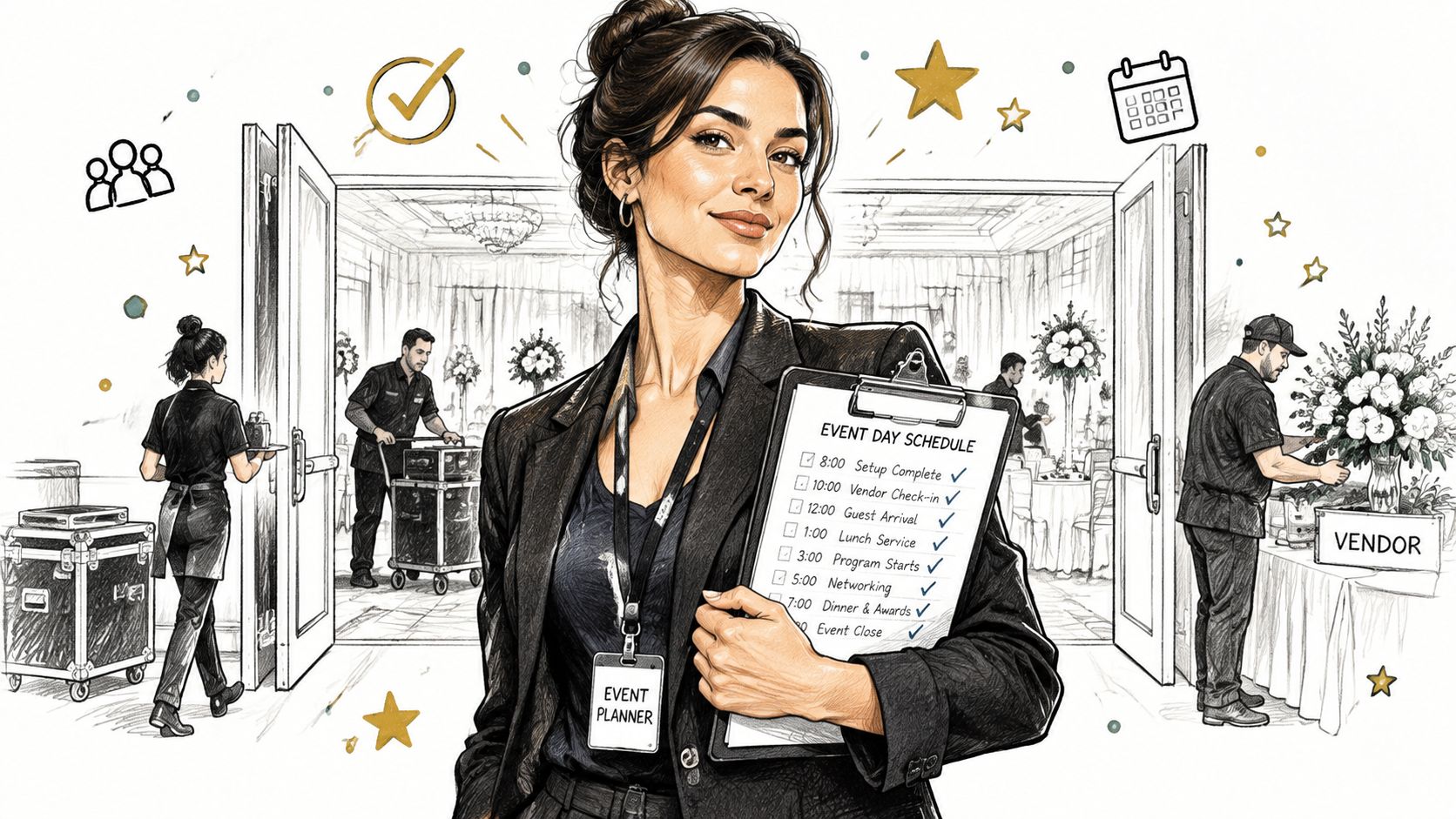
Download the template, create the detailed vendor version and simplified VIP version, assign one accountable lead to every block, and send the working schedule to vendors for confirmation. For a reception-focused starting point, use the reception schedule template and adjust it around your fixed anchors and protected buffers.
Start by entering the venue access window. Confirm the ceremony and dinner anchors, mark the buffer blocks, and only then add optional activities. A calm event day comes from making decisions and ownership visible before the first vendor arrives.
Texas Old Town offers four private halls, indoor and outdoor ceremony settings, exclusive 16-hour access, and on-site management for weddings, quinceañeras, milestone parties, and corporate events. Visit Texas Old Town to tour the property, compare venue options, and build a schedule that gives vendors room to work and guests room to enjoy the day.