You're standing at the back of an outdoor ceremony site, guests are settling into their seats, and someone asks a simple question that nobody can answer. Which microphone is the officiant using, who tested it, and what happens if it cuts out during the vows? Most couples shop for a wireless microphone for wedding ceremony use by range, battery claims and brand. That's backwards. A ceremony is a one-time live broadcast. The legal band, the channel, the person monitoring the signal and the backup sitting at the altar matter more than an advertised distance on a box.
Table of Contents
- Microphone Types for Each Ceremony Role
- Frequency Bands to Verify Before the Ceremony
- Indoor, Outdoor and Weather-Change Scenarios
- How to Set Up and Sound-Check the Microphone
- Why Signal Drops at Outdoor Ceremonies
- Backup Plan and Booking Checklist
Microphone Types for Each Ceremony Role
Match the microphone to the role, not the other way round. The officiant, the couple and a reader don't hold, move or speak the same way, so one shared microphone passed hand to hand creates problems you can avoid on paper.
| Ceremony role | Recommended microphone | Why it fits | Watch for |
|---|---|---|---|
| Officiant at a fixed altar | Wireless handheld or gooseneck | Keeps hands free for the book | Mute left on when set down |
| Couple reading vows | Lavalier clip-on, one per person | Steady distance, no handling noise | Clothing rustle and transmitter placement |
| Readers walking the aisle | Wireless handheld | Easy to hand off and move freely | Handling noise and pass-off timing |
| Outdoor lawn or gazebo ceremony | Handheld or lavalier on a coordinated channel, plus wired backup | Covers open space without cable runs | Interference and wind noise |
| Indoor hall with built-in PA | Venue wireless microphone with stand | Matches the hall PA and speakers | Battery life for a full day |
What each choice trades off
A lavalier keeps the capsule at a steady distance from the mouth, which is why it works for vows. It also picks up a necklace, a loose jacket edge or silk rubbing against the clip. Fit it, have the person turn, nod and read a line, then fix the placement before guests arrive. A handheld is forgiving for readers because they can bring it closer, but nervous hands tap, rotate and lower it. Show each reader where to hold it and how close to keep it.
A gooseneck or stand microphone gives you a predictable pickup point at a fixed altar. Nobody fumbles a pass-off, and the officiant keeps both hands on the book. The trade-off is movement. If the officiant steps away from that spot, the voice falls off. Mark the standing position during the rehearsal.
The two criteria that outrank range
First, check the operating band. A microphone that can't legally or cleanly operate on its channel at your site is useless, however far the box says it reaches. Second, check battery life for the whole day, not just the ceremony length. Batteries get installed during setup, sit through photos and waiting, then run the ceremony. Plan a full charge plus a tested spare set for every transmitter.
Counting rule: Count the speakers, then count the microphones, and add one extra for each outdoor position.
I wouldn't accept a count that leaves the officiant and the couple sharing one handheld outdoors. Every pass adds handling noise, a height change and a chance someone speaks before the microphone arrives. Assign microphones by name on your run sheet, not by a vague promise that audio is included.
Frequency Bands to Verify Before the Ceremony
Treat the ceremony as a one-time live broadcast. If the transmitter sits on a banned or crowded channel, range claims and brand names do not matter. I rank a confirmed legal band, a clear channel, and a written backup above either of those specs.
The FCC wireless microphone guidance sets July 13, 2020 as the deadline for microphones to stop operating in the reassigned 617–652 MHz and 663–698 MHz frequencies after the broadcast incentive auction was completed on April 13, 2017. An older, imported, or borrowed microphone still tuned there stays off the ceremony.
| Band or range | Status for wireless microphones | Unlicensed power limit | Action |
|---|---|---|---|
| 617–652 MHz and 663–698 MHz | No longer available; microphones had to stop by July 13, 2020 | Operation not permitted | Reject any microphone tuned here |
| 653–657 MHz duplex gap | Licensed wireless microphone users | Licensed operators must follow their license's power limit | Confirm the operator holds a license |
| 614–616 MHz guard band and 657–663 MHz duplex gap | Unlicensed use, subject to sharing and interference rules | 20 mW | Coordinate the channel with other microphones |
| TV-band channels 2–36 (below 608 MHz) | Licensed and unlicensed options under FCC rules | 50 mW | Verify the channel is clear on site |
| 902–928 MHz, 1920–1930 MHz, 2.4 GHz and 5 GHz | Permitted portions for wireless microphones | Unlicensed limits for these bands are in 47 CFR Part 15 | Ask the vendor for the exact band in writing |
Risk climbs when gear arrives from several people. The DJ brings one system, a musician brings another, and the venue adds its house microphone. Nobody has matched the full set, so two transmitters can land on the same channel or on adjacent channels that bleed into each other. Put every transmitter on one list with its band and assigned channel. One person approves that list before the rehearsal ends.
Send the venue this band checklist before you book the date:
- Exact model and operating band, in writing. The same model family is sold in different bands, so a brand name is not an answer.
- Confirmation that those frequencies sit outside the portions removed from general microphone use.
- The channel planned for the ceremony, who selected it, and where it will be written on the day-of sheet.
- A second, already-legal channel held in reserve if the first one is occupied on site.
A microphone whose band has not been confirmed should not be used for the ceremony.
Rules differ by country. Destination weddings and imported equipment need the same check against local requirements. Do not assume a system bought online is cleared for the place where you are marrying.
Indoor, Outdoor and Weather-Change Scenarios
The same microphone can sound solid in a hall, thin on a lawn and untested in the room you move to when rain arrives. Plan the setup by scenario, not by hoping one test covers every location.
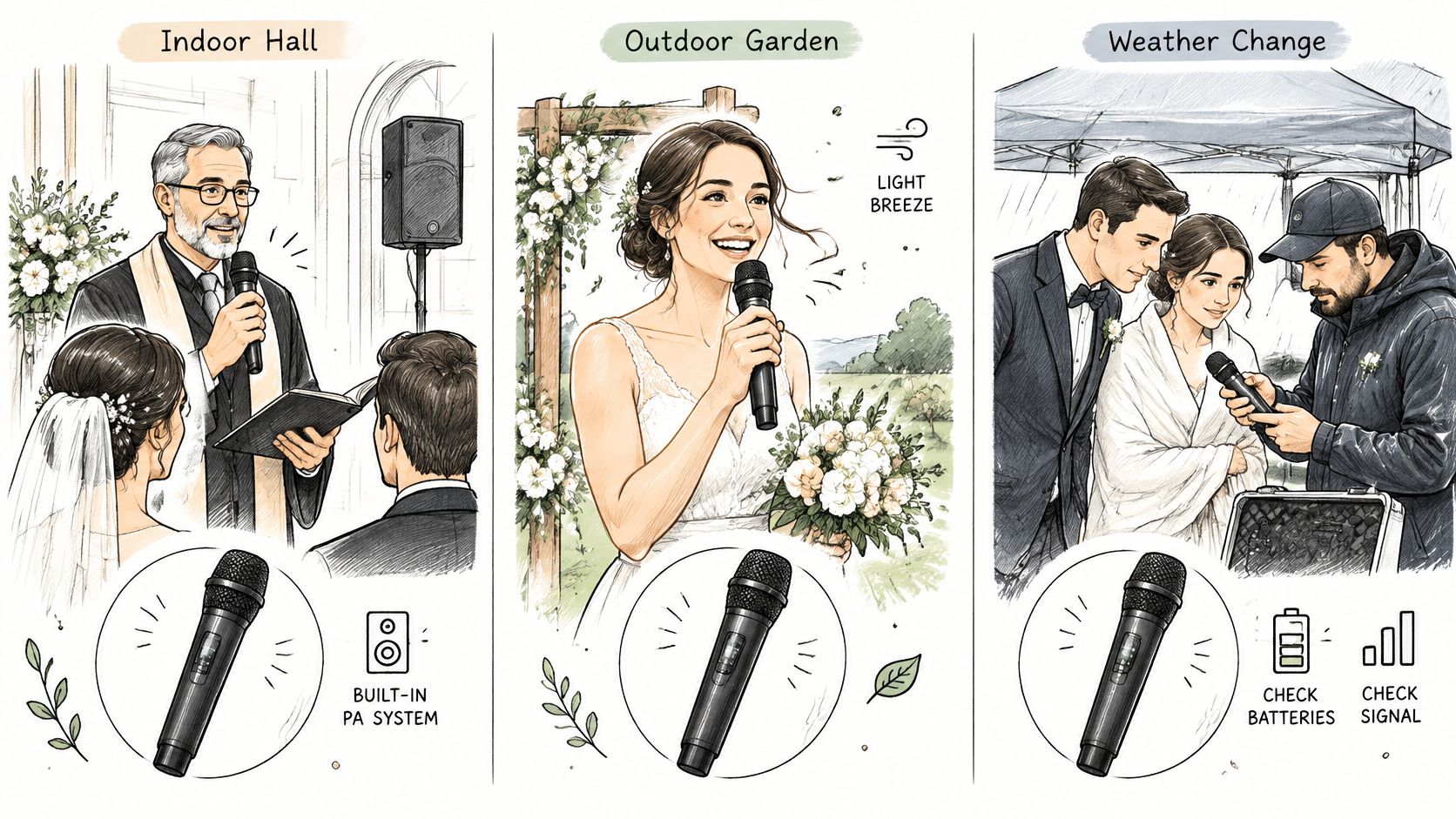
Indoor hall with a built-in PA
Say you're using a hall system with one handheld on a stand. Coverage is usually predictable because the speakers and room were matched in advance. Your main risks are simpler, a phone or laptop pairing to the Bluetooth input, a receiver left on the wrong input, or a battery that ran during rehearsal. Rule: test the exact input and playback path you'll use, then disable stray pairings before guests enter.
Open lawn for about 150 guests
Outdoors, there's no wall helping the sound reach the back rows. Keep a clear path between the speakers and seating, aim coverage across the full seating block, and test from the farthest and widest seats. Put a wired backup at the altar, already connected. Our outdoor wedding setup guidance is a useful place to align seating, speaker placement and access before the audio check. Rule: if the rear seat isn't clear at normal speaking volume, the setup isn't finished.
Rain or heat moves the ceremony indoors
A room change invalidates your outdoor test. Reflections, speaker positions, receiver placement and nearby transmitters all change. Re-test the channel in the new room, check the indoor PA input, and walk the new aisle. Keep the spare on a coordinated channel that works with the indoor setup.
Write three short lines for the venue manager. Outdoor setup, indoor setup, decision time. Under each, list the microphone, channel, speaker location and backup position. When weather forces a call, staff shouldn't be designing a new audio plan from memory.
How to Set Up and Sound-Check the Microphone
Run this routine the day before if you have access, then repeat the critical parts on the morning of the ceremony. Don't compress it into a thirty-second tap on the microphone while the officiant stands still.
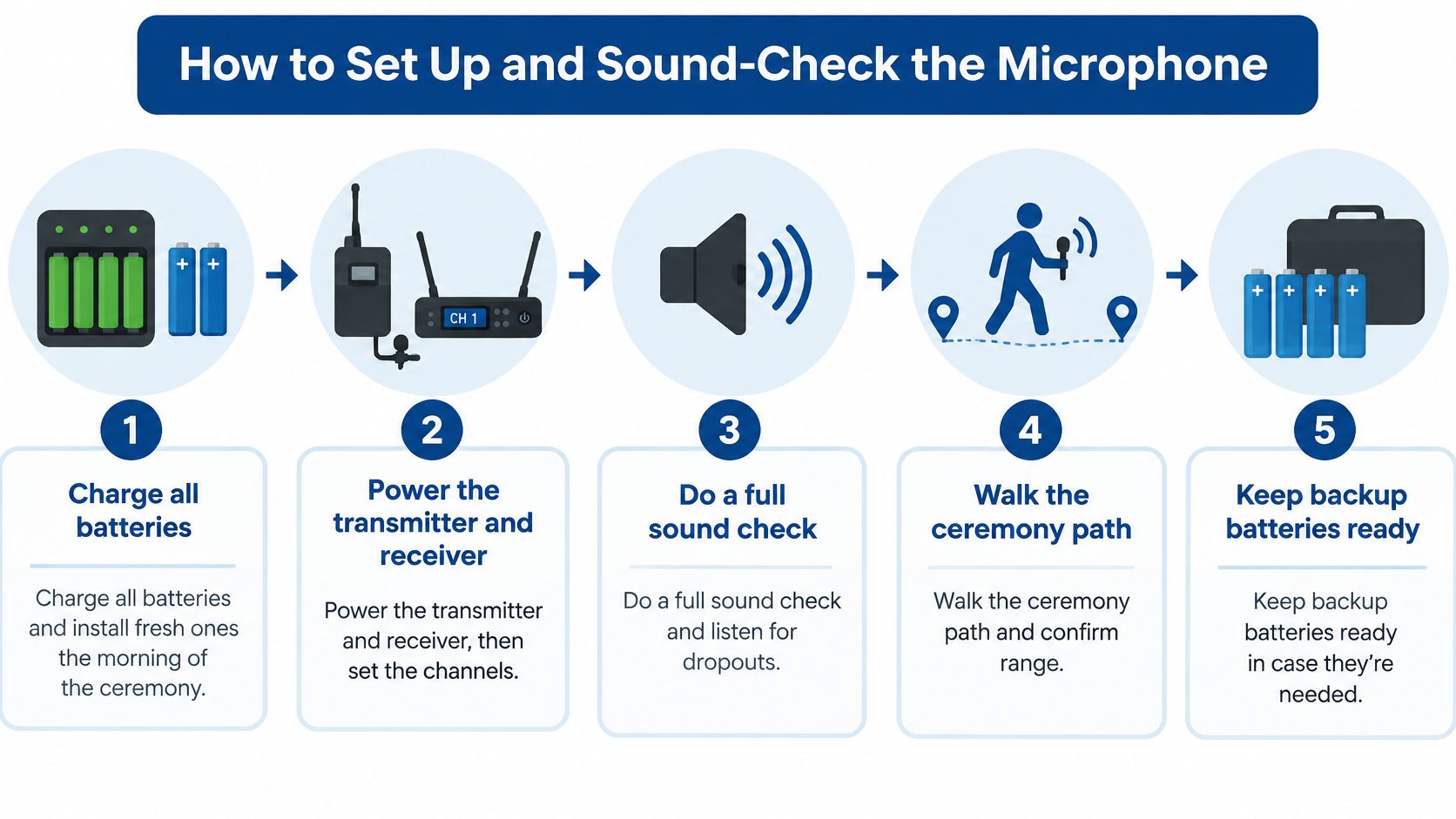
The numbered routine
- Charge and replace batteries: Charge everything the day before and install fresh batteries on the morning of the ceremony. A battery that survived setup isn't proof it'll survive waiting, photos and the full service.
- Power up and set the checked channel: Turn on the transmitter and receiver, then set the channel recorded for that site. Confirm the receiver shows a stable signal before anyone speaks.
- Set level with headroom: Have the speaker read at normal volume and set the receiver and mixer so speech is clear without sitting near distortion. Leave room for a louder laugh, an emotional line or a reader who leans in.
- Walk the actual route: Walk the aisle while speaking at normal volume, turn at the altar, and have the officiant read a real line from the ceremony position. Movement reveals handling noise, clothing rustle and spots where the signal weakens.
- Listen from the farthest seat: Stand at the rear and at the outer edges while the reading repeats. Note any hiss, thinning or dropout and fix the position or channel before guests arrive.
- Place and level the wired backup: Put the wired microphone at the altar, plug it into the PA and set it near the same level as the primary. A backup in a case backstage isn't a backup during vows.
- Assign one monitor: Name one person to watch the receiver, handle the handheld during the walk-in and respond if a mute or battery problem appears. That person shouldn't also be cueing every other part of the ceremony.
Our event sound system overview helps you confirm which PA, input and playback path your check needs to cover.
Common slip: Testing only at the altar misses aisle movement, pass-offs and the seats where guests actually struggle to hear.
A good check sounds unremarkable. The voice stays clear and steady from the rear seats, consonants don't disappear, there's no constant hiss, and turning or walking doesn't produce dropouts. If you have to tell the back row it sounded fine at the front, you haven't finished the check. Adjust speaker aim, microphone placement or level, then repeat the same reading from the same seats.
Why Signal Drops at Outdoor Ceremonies
A dropout usually isn't mysterious. Several transmitters are competing in shared radio space, or something between the transmitter and receiver is weakening the path. The FCC consumer guide on wireless microphone operation lists permitted options including TV-band frequencies below 608 MHz, parts of the 600 MHz guard band and duplex gap, 902–928 MHz, 1920–1930 MHz, and portions of the 2.4 GHz and 5 GHz bands. Being in a permitted band doesn't guarantee a clean channel at your site.
Three sources to test
- Microphones on conflicting channels: Two transmitters set too close together, or a spare powered on without coordination, can produce hits, noise or sudden loss. Power up the full ceremony set together during the check.
- Bluetooth playback on the PA: A phone paired for the walk-in can reconnect, drop, or bring notification audio into the system. Test the exact device, playlist and input you'll use, with notifications off.
- Wi-Fi, video transmitters and structures: Guest networks, cameras sending wireless video and dense electronics add traffic. A metal gazebo roof, building wall or receiver tucked behind equipment can block or reflect the signal.
People matter too. A receiver that works across an empty lawn may behave differently once rows of guests, phones and bodies fill the space. Keep receiver antennas visible and sensibly placed, not buried behind a mixer case or floral installation. Walk the full route again after the seating and décor are in place.
Some wireless microphone use has no protection from interference, which is why advertised range can't be your planning metric. A system can reach the distance and still lose to a stronger or conflicting signal.
Write down three things during testing. Channels in use, transmitter locations, and the exact spot where any dropout occurred. That log turns a vague complaint that the audio was glitchy into a fixable problem before the ceremony starts.
Backup Plan and Booking Checklist
Treat the ceremony as a live broadcast that gets one take. Vows, readings and officiant instructions can't be repeated cleanly after a battery dies or a channel drops. Under 47 CFR § 90.265, some wireless microphone operations are unprotected from interference and may have to cease on a frequency if interference affects other licensed operations. Reliability comes from procedure and backup design, not from buying the most expensive system.
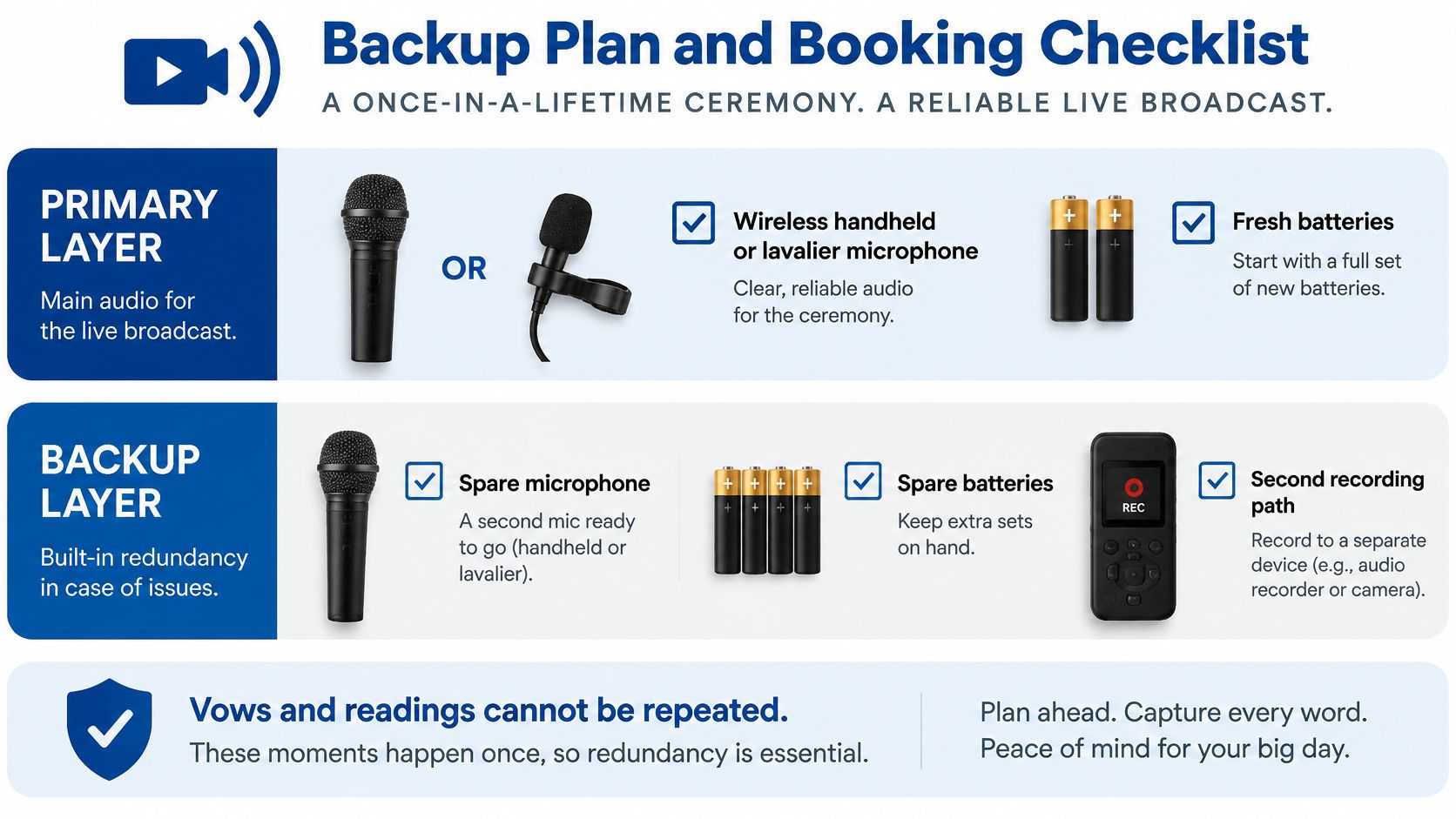
Build two layers
Layer one is the primary wireless handheld or lavalier for each assigned role, with fresh batteries installed shortly before the start time. Test it on the coordinated channel in the actual ceremony position.
Layer two is a fully tested spare microphone on another coordinated frequency, plus a wired fallback plugged into a PA input at the altar. The wired microphone should already be level-checked. If the wireless fails, the officiant steps to a working microphone instead of waiting while someone finds a cable.
Assign one owner
- Name the owner: Choose the venue manager, DJ or audio technician who'll check channels and monitor the receiver.
- Test the spare: Power it with the full microphone set, not alone after the main check.
- Place the wired backup: Connect it, set its level and mark where it stays during the ceremony.
- Brief the officiant: Show the mute control, the standing mark and where to go if the primary fails.
The officiant and couple should never troubleshoot. Their job is to keep speaking calmly and move to the backup position if directed. The owner carries spare batteries, knows which transmitter belongs to each person and watches for a mute left on after a microphone is set down.
If nobody can name the audio owner, you don't have a backup plan yet.
Four questions to send before booking
- Which band is the wireless microphone on: Ask for the model and operating band in writing.
- Is a spare available on the day: Confirm it's tested, coordinated and assigned to a named person.
- Can we sound-check at the outdoor ceremony site: Put the check on the walkthrough schedule, not as an optional extra.
- Which indoor room is the weather fallback: Confirm the alternate PA, channel and setup for that room.
Use our outdoor wedding checklist to place those answers beside seating, weather timing and vendor arrival details. At Texas Old Town, each of the four halls includes one indoor PA system with Bluetooth hook-up, one outdoor PA system with Bluetooth hook-up, and one wireless microphone with stand, and the indoor reception hall can also be used for the ceremony if preferred. Confirm how those pieces will be assigned for your date in writing, because a venue inventory list isn't the same as a ceremony audio plan.
Finish with a one-page day-of sheet. Write the owner, primary channel, spare channel, battery change time, wired backup location and indoor fallback room on it. Give copies to the planner, officiant and audio owner. When a problem lasts five seconds instead of five minutes, guests remember the vows, not the troubleshooting.
At Texas Old Town, our four halls each include indoor and outdoor PA systems with Bluetooth hook-up and a wireless microphone with stand, with an indoor reception hall available as a ceremony fallback when Texas weather changes the plan. Bring the four booking questions above to your tour, confirm the band, spare and sound-check owner in writing, and visit Texas Old Town to start planning a ceremony your back row can hear clearly.